Email & Calendar Conversational AI
In short
Turn your inbox and calendars into a secure conversational pipeline that handles sales, support, and scheduling automatically.
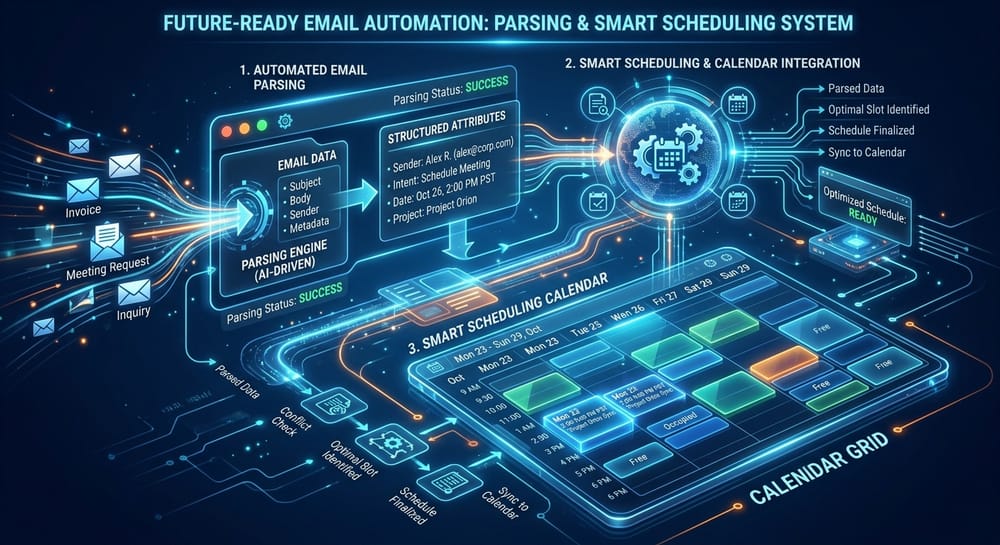
Email and calendar management are the biggest operational time-sinks in most modern offices. Our Conversational Email and Calendar Automation transforms standard shared inbox mail boxes and user schedules into an integrated operational engine. The AI behaves like an elite chief of staff, evaluating every incoming meeting, draft message, and scheduling clash, arranging ideal schedules automatically.
Key Architecture Features
Conversational Bookings
Natural text interactions negotiate meeting slots without requiring rigid scheduling links.
Shared Mailbox Dispatch
Automatically sorts and answers incoming group emails (support@, accounts@, orders@) in seconds.
No-Show Prevention Loops
Integrated email and SMS follow-ups verify appointment slots, gathering pre-meeting briefs.
Technical System Specifications
- [1]Microsoft Graph API and Google Workspace API integrations
- [2]Multi-mailbox and shared calendar monitoring networks
- [3]Time-zone conversions and daylight savings adjustments
Execution Blueprint
Executive Calendar De-cluttering
An executive's inbox is flooded with calendar requests from 15 prospects. The AI calendar agent reviews all messages, aggregates dates, detects conflicts across personal and professional calendars, proposes alternative times, books meetings, and blocks preparation periods.
Standards and further reading on Email & Calendar Conversational AI
The architecture above follows published standards rather than our own house rules. These are the primary sources, so you can check the reasoning yourself.
- Privacy Framework — NIST
- Cybersecurity best practices — CISA
Common questions about Email & Calendar Conversational AI
The questions that come up when this sits between your existing systems, answered plainly.
It is scoped to the mailboxes, labels or folders the workflow needs, not to everything an account can reach. Permissions are agreed before the build and are least-privilege by default, with access logged continuously.
It reads the thread rather than only the latest message, so a rescheduling request that references an earlier proposal is understood in context. Where the thread has become genuinely ambiguous, it hands over rather than picking one reading.
Yes. Working hours, buffers, meeting types and blocked periods come from the calendar you already maintain, so the agent inherits your rules rather than requiring a second set to be configured.
Yes. A shared inbox or a team calendar is a common deployment, and the agent tracks what it has already handled so two people do not receive duplicate work. Individual rules can still differ within the same deployment.
Deploy Email & Calendar Conversational AI in your stack
Book a Free 1-Hour Consultation and get a custom feasibility blueprint built strictly for your stack.